
These two providers sit at opposite ends of the PEO spectrum—and that’s exactly why comparing them gets confusing.
CoAdvantage operates as a traditional PEO with dedicated service teams and a co-employment model built for companies wanting hands-on HR support. Rippling started as an HR tech platform that added PEO services later, creating a hybrid that appeals to companies prioritizing automation and system integrations.
The right choice depends less on which is “better” and more on how your company actually operates day-to-day. This comparison breaks down the real decision factors—not feature checklists—so you can evaluate which model fits your operational reality.
1. Service Model: Dedicated Teams vs Self-Service Automation
The Operational Question
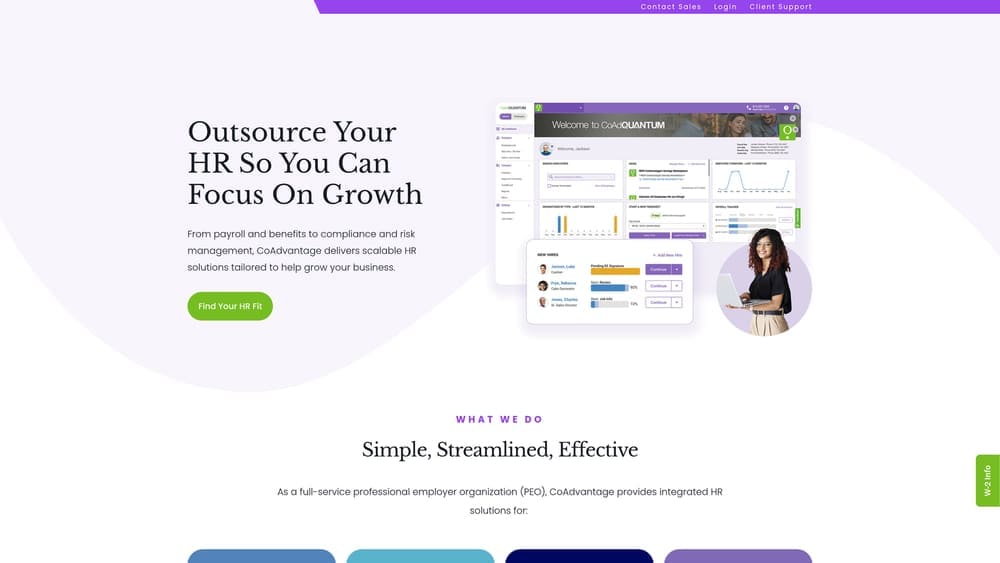
This is where the philosophical split becomes immediately visible. CoAdvantage assigns you a dedicated service team—actual people who learn your business, answer questions, and handle HR issues as they arise. Rippling gives you a platform with support available when needed, but the expectation is that you’ll manage most functions through their software interface.
Neither approach is wrong. The question is whether your internal team has the bandwidth and expertise to drive HR operations independently, or whether you need a partner who proactively manages compliance, benefits, and employee issues on your behalf.
What This Looks Like in Practice
With CoAdvantage, you typically work with the same HR representative for ongoing issues. When an employee has a benefits question, your rep handles it. When you’re uncertain about a termination procedure, you call your contact. The relationship is consultative—they’re positioned as an extension of your team.
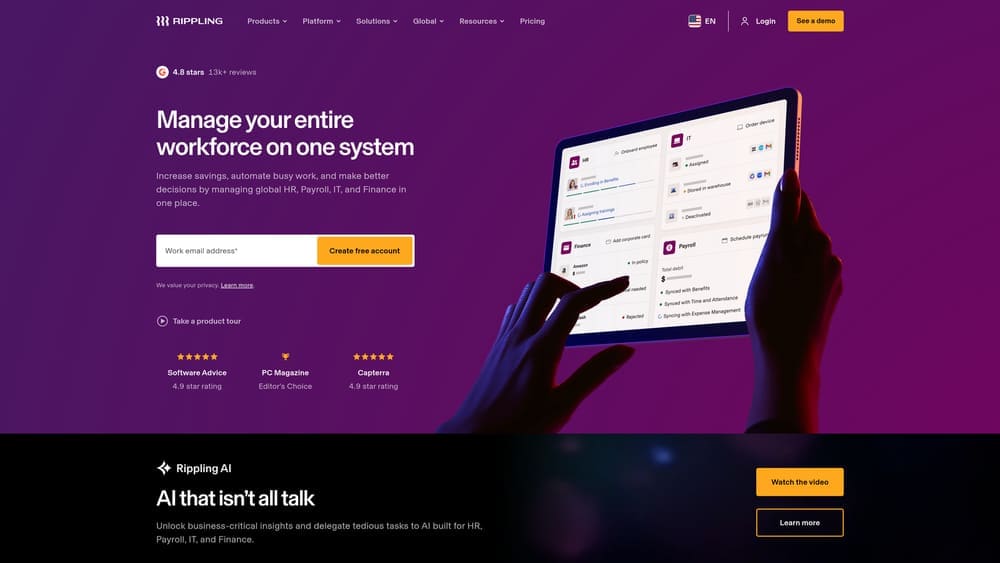
Rippling operates differently. You log into the platform to run payroll, adjust benefits, generate reports, and manage employee data. Support exists, but the system is designed for you to execute tasks independently. If you’re comfortable with software and prefer control over delegation, this model can feel faster and more direct.
Decision Factors
Consider your internal HR capacity honestly. If you have one person wearing multiple hats—office manager handling HR, finance, and operations—the dedicated team model often reduces stress and risk. If you have an experienced HR professional who values efficiency and direct system access, the self-service platform may align better with how they prefer to work.
Also think about your team’s comfort with technology. Rippling assumes you’re willing to learn their system and navigate it regularly. CoAdvantage assumes you’d rather offload that complexity to someone else.
Pro Tips
During demos, test realistic scenarios. Ask CoAdvantage how quickly your rep responds to urgent questions and what happens if they’re unavailable. Ask Rippling how intuitive their platform actually is for someone without HR software experience. Don’t accept generic answers—push for specifics based on your actual operational needs.
2. Technology Integration: Closed Ecosystem vs Open API Architecture
Why This Matters More Than You Think
Your PEO doesn’t operate in isolation. It needs to connect with accounting software, time tracking tools, expense management systems, and potentially industry-specific platforms. How well a PEO integrates with your existing tech stack directly affects operational efficiency and data accuracy.
Rippling built its entire platform around integrations. Their API-first architecture means they connect natively with hundreds of business applications. CoAdvantage operates more as a standalone system with limited integration options, which works fine if you’re willing to adapt your processes around their platform.
The Real-World Impact
If you’re running QuickBooks, Xero, or NetSuite for accounting, Rippling likely has a direct integration that syncs payroll data automatically. If you use project management tools, time tracking software, or industry-specific applications, Rippling’s open architecture makes connecting them straightforward.
CoAdvantage takes a more traditional approach. Payroll data may require manual export and import. Benefits information might not flow automatically into your accounting system. This isn’t necessarily a dealbreaker—plenty of businesses operate this way successfully—but it does mean more manual reconciliation and potential for data entry errors.
Evaluating Your Tech Stack Needs
List every system you currently use that touches employee data: accounting, time tracking, benefits enrollment, performance management, expense reporting. Then ask each provider specifically how data flows between their platform and yours.
If you’re planning to add new software in the next 12-24 months, factor that into your evaluation. Rippling’s flexibility makes future integrations easier. CoAdvantage’s closed system may limit your options or require workarounds. Understanding PEO payroll integration capabilities is essential before committing.
Pro Tips
Don’t just ask if an integration exists. Ask how it works. Does data sync automatically or require manual triggers? Is it bidirectional or one-way? What happens when there’s a sync error? The quality of integrations matters as much as their existence.
3. Pricing Structure: Per-Employee Flat Rate vs Percentage-Based
Why Pricing Models Matter
CoAdvantage typically prices as a percentage of gross payroll—common in traditional PEOs. Rippling uses per-employee-per-month flat rates. This structural difference creates significantly different cost implications depending on your payroll composition and growth trajectory.
Percentage-based pricing means your PEO costs rise and fall with payroll. If you give raises, hire higher-paid employees, or pay bonuses, your PEO fees increase proportionally. Flat-rate pricing remains consistent regardless of what you pay employees.
When Each Model Works Better
Percentage-based pricing can favor companies with lower average salaries or significant payroll fluctuations. If your workforce is seasonal or hourly, paying a percentage when payroll is low reduces costs during slower periods.
Flat-rate pricing benefits companies with higher-paid employees or stable headcount. If you’re paying software engineers or executives well above average wages, a per-employee rate caps your PEO costs in a way percentage-based pricing doesn’t. A detailed PEO cost breakdown example can help you model both scenarios.
Hidden Cost Factors
With CoAdvantage, understand exactly what’s included in the percentage and what costs extra. Workers’ compensation, state unemployment insurance, benefits administration fees—these may be bundled or separate. Ask for a complete cost breakdown including all potential add-ons.
With Rippling, the per-employee rate covers core PEO services, but modules are often priced separately. If you want advanced features—certain integrations, additional reporting, specific compliance tools—expect additional per-employee charges that stack on top of the base rate. Watch out for hidden PEO fees that can inflate your total spend.
Pro Tips
Run actual cost projections using your current payroll data. Request quotes that reflect your real employee count, average salaries, and benefit participation rates. Don’t compare advertised rates—compare total projected costs based on your specific situation. And model what happens if you grow 20-30% next year.
4. Benefits Access: Master Health Plans vs Broker Flexibility
The Structural Difference
CoAdvantage operates with master health plans—you join their existing insurance pools alongside other client companies. This pooling creates negotiating leverage with carriers and can provide access to better rates than you’d get independently, particularly if your company is small or has claims history concerns.
Rippling takes a different approach. They work with benefits brokers and allow more flexibility in plan sourcing. You’re not locked into specific master plans, which means more customization options but potentially less pooling advantage.
Advantages and Tradeoffs
Master plans through CoAdvantage simplify benefits administration. You’re selecting from their curated options rather than navigating the entire insurance market. For companies without benefits expertise, this reduces complexity and decision fatigue.
The tradeoff is limited customization. If you have specific coverage requirements, want to maintain relationships with particular brokers, or need specialized plans for your industry, master plan restrictions may feel constraining.
Rippling’s flexibility lets you work with your existing broker or choose new options. If you’ve already negotiated favorable terms or have unique benefits needs, this model preserves your existing arrangements. The downside is less pooling leverage—you’re negotiating more as an individual company than as part of a larger group.
Evaluating for Your Situation
If you’re currently struggling with benefits costs or administration, CoAdvantage’s master plans may deliver immediate relief. If you’re satisfied with your current benefits but want better HR and payroll infrastructure, Rippling’s flexibility lets you maintain what’s working.
Ask both providers for sample plan options and projected costs based on your employee demographics. Compare not just premiums but coverage levels, network quality, and employee contribution structures. Learning how to manage open enrollment through your PEO helps you evaluate each provider’s benefits administration capabilities.
Pro Tips
Understand renewal terms and rate adjustment policies. Master plans can provide stability, but you’re also subject to the pool’s overall claims experience. Flexible sourcing gives you more control but requires more active management during renewal periods.
5. Compliance Support: Proactive Guidance vs Self-Managed Tools
Different Approaches to Risk Management
Compliance is where the service model difference becomes operationally critical. CoAdvantage positions compliance as a consultative service—their team monitors regulatory changes, alerts you to requirements, and helps you implement necessary updates. Rippling provides compliance tools and resources but expects you to drive implementation.
Neither approach eliminates compliance risk entirely, but they distribute responsibility differently. One model relies on human expertise and proactive guidance. The other provides software infrastructure and assumes you’ll manage compliance actively.
What This Means Day-to-Day
With CoAdvantage, compliance support typically includes regular check-ins, policy reviews, and alerts about regulatory changes affecting your business. If new posting requirements emerge, they handle it. If state-specific leave laws change, they notify you and help adjust policies accordingly.
Rippling’s platform includes compliance dashboards, policy templates, and automated reminders. You can track requirements, generate necessary documentation, and manage compliance workflows—but you’re driving the process. The system supports compliance; it doesn’t manage it for you. Understanding PEO shared liability helps clarify what each provider actually takes responsibility for.
Matching Support to Internal Capability
Evaluate your internal HR expertise honestly. If you have experienced HR staff who understand compliance frameworks and stay current on regulatory changes, Rippling’s tools may provide everything you need without paying for consultative services you won’t use.
If compliance feels overwhelming, if you’re in multiple states with varying requirements, or if you lack dedicated HR expertise, CoAdvantage’s proactive approach reduces risk exposure. The consultative support becomes valuable insurance against costly mistakes.
Pro Tips
Ask specific questions about multi-state compliance if you have remote employees. How do they handle varying leave laws, posting requirements, and wage-hour regulations across jurisdictions? Request examples of how they’ve helped clients navigate complex compliance situations similar to yours.
6. Scalability and Exit Considerations
Planning Beyond the Initial Contract
Most businesses evaluate PEOs based on current needs. Smarter evaluation includes what happens when you outgrow the relationship or need to make a change. Contract terms, data portability, and transition complexity vary significantly between providers.
Traditional PEOs like CoAdvantage often use annual contracts with specific termination windows and notice requirements. Missing your renewal window can lock you in for another year. Rippling’s platform approach typically offers more flexibility, but you need to understand exactly what happens to your data and integrations if you leave.
Growth Trajectory Questions
If you’re planning significant growth, ask how each provider scales. CoAdvantage’s service model scales through adding team capacity—will you keep the same dedicated rep or transition to a different team structure as you grow? Rippling’s platform scales more easily from a technology standpoint, but confirm there aren’t hidden tier changes or pricing jumps at specific headcount thresholds.
Also consider geographic expansion. If you’re adding employees in new states, how does each provider handle multi-state complexity? CoAdvantage’s compliance expertise may become more valuable as geographic complexity increases. Rippling’s platform handles multi-state administration efficiently but requires you to understand the compliance implications. Reviewing national PEO companies can help if multi-state operations are in your future.
Exit Planning
Understand data ownership and portability before signing. What employee data can you export if you leave? In what format? How long does the transition process take? What happens to benefits coverage during the transition?
With CoAdvantage, exiting a traditional PEO means transitioning payroll, benefits, and workers’ compensation to new providers—often requiring 60-90 days of coordination. With Rippling, data export is typically cleaner given their platform architecture, but you’re still transitioning critical systems. Having a solid PEO exit strategy guide prepared before signing protects your flexibility.
Pro Tips
Read the actual contract, not just the sales proposal. Pay attention to termination clauses, notice requirements, and any penalties for early exit. Ask what happens if you’re unsatisfied mid-contract—can you negotiate an early exit or are you locked in regardless of service quality?
7. When Neither Is the Right Fit
Recognizing Misalignment
Sometimes the right answer is neither option. If you’re evaluating CoAdvantage vs Rippling but finding neither addresses your actual operational challenges, that’s a signal to reconsider your approach entirely.
CoAdvantage may not fit if you need highly specialized industry expertise, require extensive customization, or operate in a regulatory environment where their standard service model doesn’t provide sufficient depth. Rippling may not work if your team lacks the technical comfort to manage a platform independently or if you need more hands-on support than their model provides.
Alternative Scenarios
If you’re a larger company with established HR infrastructure, a full PEO relationship may be overkill. Administrative services organizations (ASOs) provide payroll and benefits administration without co-employment, giving you more control while reducing administrative burden. Understanding the PEO vs ASO decision factors helps clarify which model fits your situation.
If you’re very small—under 10 employees—and primarily need payroll with basic benefits, standalone payroll providers with benefits add-ons may deliver what you need at lower cost than either PEO option.
If your industry has specialized compliance requirements—healthcare, construction, hospitality—consider PEOs with deep vertical expertise rather than generalist providers. Neither CoAdvantage nor Rippling positions themselves as industry specialists, which may matter depending on your regulatory complexity.
Red Flags to Watch
If either provider’s sales process feels pushy or dismissive of your concerns, trust that instinct. PEO relationships are operationally intimate—you’re outsourcing critical functions. If the sales experience suggests poor communication or misaligned expectations, implementation will likely be worse.
If pricing isn’t transparent or you’re getting vague answers about total costs, walk away. Both providers should be able to give you clear, detailed cost projections based on your actual employee data.
Pro Tips
Don’t force a decision between two options if neither feels right. Expand your evaluation to include other providers with different service models. The PEO market is competitive—better fits exist if you’re willing to look beyond the most visible brands.
Making the Decision
The CoAdvantage vs Rippling decision ultimately comes down to operational philosophy: Do you want a PEO partner that handles HR complexity through human expertise, or a platform that automates HR functions while you maintain more direct control?
Neither approach is universally superior. Map your evaluation to your actual operational needs—internal HR capacity, tech stack requirements, growth trajectory, and risk tolerance.
Request demos focused on your specific use cases, not feature tours. Bring your real challenges to the conversation. Ask how they’d handle situations you’ve actually faced or anticipate facing. Watch how they respond to complexity and uncertainty.
Before signing, understand exactly what happens if you need to exit. Read the contract. Ask about termination procedures. Confirm data ownership and portability. The best PEO relationship is one you can leave cleanly if circumstances change.
Before you renew your PEO agreement, compare your options. Most businesses overpay due to bundled fees and unclear administrative markups. We break down pricing, services, and contract structures so you can make a smarter decision.
The right choice depends less on which provider has better marketing and more on which operational model matches how your business actually works. Take the time to evaluate honestly—this decision affects every employee and touches nearly every business function.